

Postman Collection Load Testing
Postman Load Testing From 40+ Locations
Your Postman collection is the load test.
Import the collection JSON or a shared link. LoadView runs it with the concurrent users, duration, and geographic locations you specify, using the assertions you already wrote.
LoadView is the only load testing platform that runs Postman collections without conversion and with full load curve control.
No credit card
No contract
Up to 5 free tests on signup


Can you load test with a Postman collection?
Import
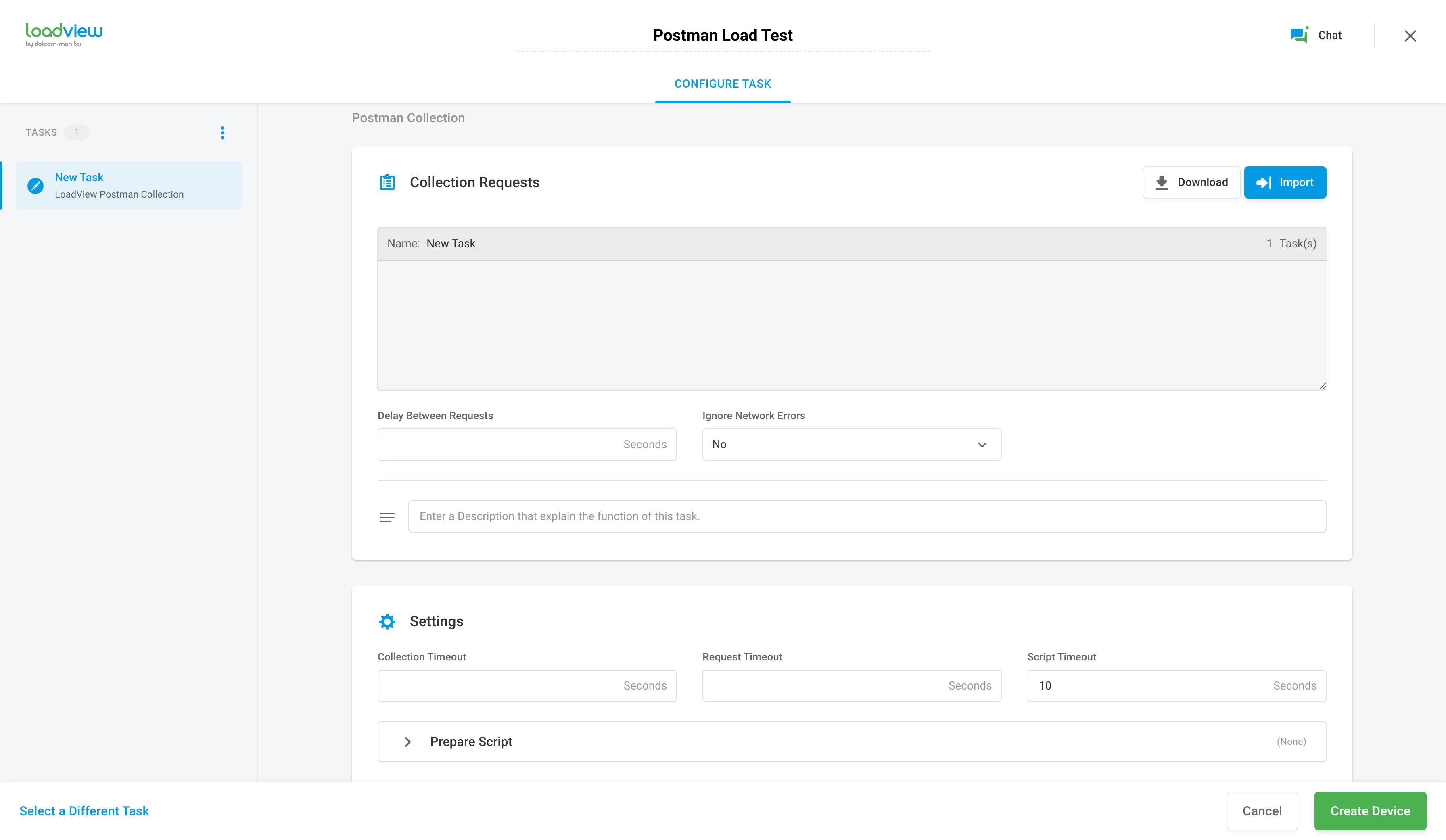
Upload the collection JSON file, or paste the public link to a published collection. Requests appear in the Collection Requests panel, and collection settings import automatically.
Configure
Set request delays, timeouts, validation thresholds, and user behavior. Choose a load curve, the number of concurrent virtual users, the duration, and your test locations.
Run & analyze
LoadView calibrates the test, then runs it. Review response time and status code for each request, by geographic location.
Step-by-step setup screenshots: the Postman load testing walkthrough ·
Setup reference: Postman Collection task documentation
Comparison
Postman Performance Testing Compared to a Dedicated Load Testing Platform
Postman added performance testing to the Collection Runner. It runs a collection with multiple virtual users from a single origin: your machine or Postman’s cloud. There is no option to select the geographic origin of the load, no route to an API behind a firewall, and no load curve.
Postman is primarily designed for API development and functional testing. LoadView imports the same collection file and runs it with distributed load. The table below shows what each platform requires to run an existing collection as a load test.
| LoadView | Postman (native) | Gatling | Grafana k6 | Apache JMeter | BlazeMeter | |
|---|---|---|---|---|---|---|
| Runs a Postman collection | Native, JSON file or shared link | Native (it’s Postman) | Via npm package, JSON export only | Converter required | Converter required | Native upload (Newman) |
| Rewrite or convert your script? | No | No | Yes, JS/TS project required | Yes, becomes a k6 JS file | Yes, becomes a .jmx file | No |
| Geo-distributed load | 40+ zones, AWS & Azure | None for performance tests | Enterprise Edition | 20+ locations (Cloud) | You provision it | Yes |
| Behind-firewall / on-premise | Static proxy IPs, On-Site Agent, On-Prem injector | Local runs only (single machine) | Self-hosted OSS; Private Locations (Enterprise) | Self-hosted OSS; Private Load Zones (Cloud) | Self-hosted by design | Private locations (higher tiers) |
| Your Postman assertions reused as pass/fail | Yes | Yes | Partial, no pre/post-request scripts | All except Hawk auth; converter drops pm.sendRequest |
Rewritten as JMeter assertions | Yes (functional runs) |
| Concurrency & ramp-up on the collection | 3 load curve types | Virtual users + duration | Full Gatling DSL | Full k6 stages | Thread groups | Not supported via the Newman executor |
| Entry price | $0 on-demand · $129/mo annual | Cloud runs billed per VU-hour | Free (OSS). Postman component capped at 5 users, 5 min on Community Edition | Free tier: 500 VU-hours/mo | Free (you pay for infrastructure) | Free tier: 50 users, 20-min tests |
Last reviewed 31 August 2026. Competitor products change frequently. Verify current details with the vendor before making a purchasing decision. LoadView pricing reflects list rates on the LoadView pricing page.
Setup
Import an Existing Postman Collection
LoadView runs the collection file directly, so there is no conversion step and no second script to maintain.
Import
Upload the collection JSON, or paste the link to a published collection. Requests and settings come across automatically.
Assertions
The tests written in Postman determine whether each session passes or fails under load.
Test settings
Request delays, timeouts, and error handling are configurable per test. The defaults work for most collections. Setup guide
Validation
Postman Assertions Determine Pass or Fail
Validation logic does not need rewriting in another assertion language. The conditions specified for requests in Postman verify API responses during the load test. If a condition is not met during a session, that session is marked failed.
- Your assertions run on every virtual user session
- Failures are reported per geographic location
- Identify the failed request and the server response
Load curves
Three Load Curve Options
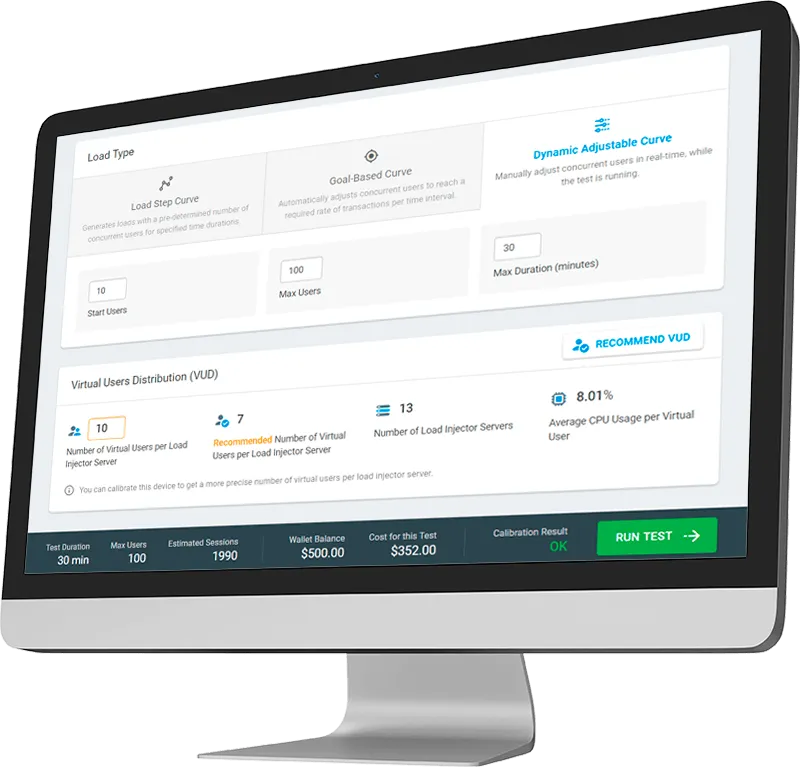
One imported collection runs with any of the three curve types.

Load Step Curve
Increase or decrease concurrent users in defined increments over a set duration. Use it to find the concurrency level at which response time degrades.

Goal-Based Curve
Test against a throughput target: a set number of transactions in a fixed interval. Use it to validate an SLA or a capacity plan.

Dynamic Adjustable Curve
Change concurrent users and their distribution across regions during the test, between a set minimum and maximum. Use it to find the failure point interactively.
Results
Analyze Postman Load Test Results
LoadView records the same request details as the Postman console, for every virtual user session and every location in the test.
- Response time and status code for every request in the collection
- Compare response times by geographic location
- Request headers, variable values, and server response bodies for troubleshooting
Security
Secure API Credentials in Postman Collections
Store credentials in Secure Vault rather than embedding them in the collection. Values are encrypted, passed to the test when it runs, and masked in test reports. Access requires an account permission.
For internal APIs, on-premise load injectors run the test inside your own network. How Secure Vault works with Postman.
Test locations
Generate Load From 40+ Geographic Locations
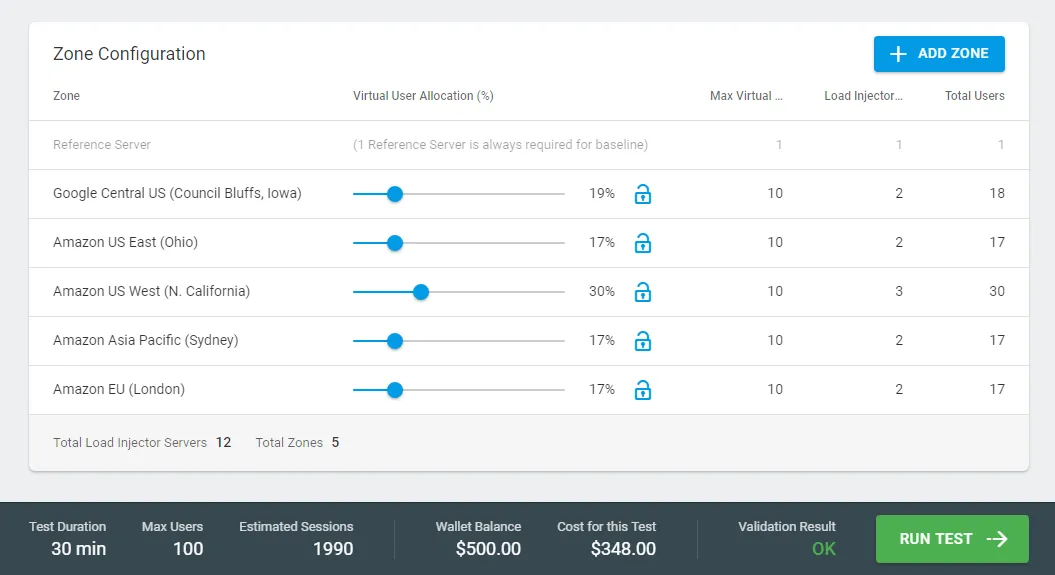
Load injector servers run in over 40 zones on Amazon Web Services and Azure, across the United States, Canada, South America, Europe, Africa, the Middle East, and APAC. LoadView manages the infrastructure, so there is no hardware to provision and no cloud account of your own to connect.
- Compare response times by region
- Set the share of load assigned to each zone
- Static proxy IPs for whitelisted environments
- On-Site Agent and On-Prem injectors for internal APIs
Automation
Run Postman Load Tests in CI/CD
Trigger the load test on every build and fail the build when the test does not meet your performance criteria.
Jenkins
Trigger performance tests at defined development stages. A Failed Sessions Threshold fails the build when too many sessions fail.
Azure DevOps
Integrate load testing into Azure pipelines to automate performance validation inside your deployment workflow.
CircleCI
Initiate a LoadView test during the build; exceeding the failed-session percentage generates an error in CircleCI.
Pricing
LoadView Pricing
Run up to 5 free tests on signup. No credit card, no contract.
| Plan | Annual | Monthly | Concurrent HTTP users | Load injector hours | Max test duration |
|---|---|---|---|---|---|
| On-Demand | — | $0 commitment | Unlimited | Pay per test | 4 hours |
| Starter | $129/mo | $199/mo | 1,000 | 30 | 4 hours |
| Professional | $454/mo | $699/mo | 10,000 | 100 | 4 hours |
| Advanced | $899/mo | $1,499/mo | 30,000 | 250 | 4 hours |
Save up to 40% with annual plans. Unlimited parallel testing and unused resource rollover on all subscription plans. 90-day refund policy, pro-rated (see terms). Full pricing and Enterprise options
FAQ
Postman Load Testing Questions
Can Postman do load testing?
Postman can run a collection with multiple virtual users from your machine or from its cloud, but the load originates from one place. Use a dedicated load testing platform such as LoadView when you need to select the geographic origin of the load, reach an API behind a firewall, or ramp concurrent users up and down during the test.
How do I load test a Postman collection?
Import the collection JSON file or a shared link into LoadView, then set the concurrent users, test duration, and geographic locations. Your existing assertions decide whether each session passes. Nothing is converted or rewritten. The step-by-step walkthrough shows each screen.
Do I have to convert my Postman collection to another format?
No. LoadView runs the collection itself. JMeter and k6 require a third-party converter that produces a separate script. You then maintain that script alongside the original collection and re-convert it whenever the collection changes.
Will my Postman tests still decide pass or fail?
Yes. The conditions you wrote in Postman verify responses during the load test, and a session that fails one is marked failed. Add the validation to the collection before importing it.
How much load can I generate?
Plans go up to 30,000 concurrent users, and because LoadView runs in the cloud there is no fixed ceiling on the platform itself. If you are planning a very large test, a performance engineer can size it with you on a demo call.
Where can I generate load from?
Over 40 zones on AWS and Azure across North and South America, Europe, Africa, the Middle East, and APAC. You can also generate load from inside your own network using static proxy IPs, an On-Site Agent, or on-premise load injectors.
Is it safe to upload a collection with API keys in it?
Store credentials in Secure Vault rather than leaving them in the collection. Values are encrypted, masked in test reports, and visible only to account users with the corresponding permission. How Secure Vault works with Postman
What does it cost to try?
Nothing. Every new account includes up to 5 free tests, with no credit card and no contract. Paid plans start at $129 per month billed annually. Start free
Related Resources
Postman Load Testing Tutorial
Setup screenshots, Postman load testing limitations, and how to build a first test from a collection.
API Load Testing
Build multi-request HTTP tests for REST, SOAP, and Web APIs directly in LoadView, without a collection.
JMeter & Selenium Load Testing
Run existing JMeter and Selenium scripts on the same distributed network.
Run Your Postman Collection With Thousands of Concurrent Users
No credit card and no contract. Every new account includes up to 5 free tests.