

Why a Single-IP Test Looks Fine but Isn’t
A single-IP load test can look successful on paper. The script runs, dashboards populate, and latency stays within the target range. The issue is that the results often reflect the test setup more than real production traffic.
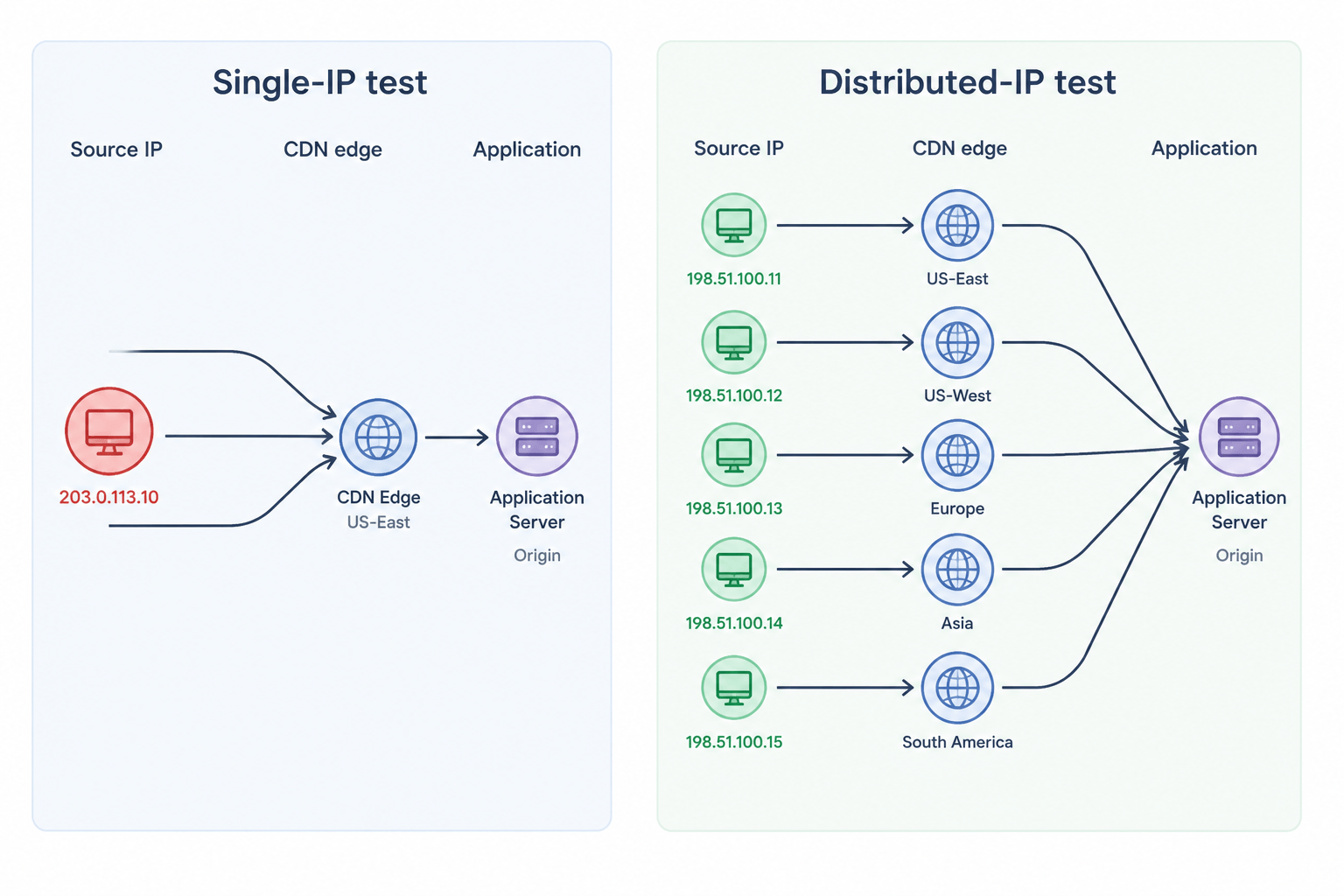
Production traffic does not arrive from one address. A consumer-facing endpoint sees traffic from thousands of residential ISPs, mobile carriers, corporate NATs, and data-center proxies. Each request lands on a different CDN edge node, traverses a different middlebox, and hits a different shard of the connection pool. When you collapse all that diversity into a single source IP, every layer that keys off the source address starts behaving in ways that have no real-world counterpart.
The result is misleading performance data that does not reflect real production behavior.
Seven Specific Failure Modes of Single-IP Load Tests
Single-IP load tests can distort or completely miss several real-world behaviors.
1. Rate Limiters Return the Wrong Number
Modern rate limiters operate per source identifier, and the most common identifier is the source IP. Token-bucket, fixed-window, and sliding-window algorithms all share that property. Even teams that also key limits off auth tokens or user IDs almost always layer per-IP limits underneath; the IP layer is what protects the application from unauthenticated abuse. When a heavy virtual-user load drives all of its traffic from one IP, the limiter sees that load as one client and starts rejecting requests well before the application sees stress. The application looks fast because the limiter absorbed the load. In production, the same total request rate would arrive from thousands of distinct source IPs and the limiter would let it through.
The mirror image is also true. If the limiter has a generous per-IP budget, a single-IP test never gets close to the aggregate limit at the load balancer. The application gets pummeled and the limiter never engages, hiding the fact that production traffic would be partially shed.
2. WAFs and Bot-Detection Trigger on the Harness
A WAF watching for bursty, uniform request patterns from one IP is doing exactly the job it was designed for. It sees the load test, fingerprints the traffic, and either rate-shapes, challenges, or blocks it. Some teams discover this only when the test plateaus at a suspiciously round throughput number that turns out to be the WAF’s threshold. Tests that exercise DDoS protection paths need diverse sources for the same reason—these defenses are typically separate from the WAF and even more dependent on source-IP diversity to engage realistically.
Disabling the WAF for the test “fixes” the symptom and creates a worse problem: the test path no longer matches the production path. Traffic from many IPs is the only way to validate that the application performs while the WAF is engaged at production thresholds.
3. CDN Edge Selection Collapses to One Node
CDNs route requests to the edge closest to the client. From one IP, traffic lands on one edge POP. The cache fills there, all subsequent requests hit warm storage, and the test reports cache-hit latency for the entire run. Meanwhile, the long tail of cold edges across other regions never gets exercised. Anyone reading guidance on load testing CDN-fronted sites sees this called out: cache behavior is a function of source distribution, not just request rate.
The opposite case matters too. Cache-miss origin shielding behavior, where a CDN coalesces concurrent misses into a single origin fetch, is invisible from one IP. You cannot validate origin protection without traffic that the CDN treats as independent.
4. Anycast and GeoDNS Routing Decisions Never Fire
Anycast IPs route packets to the topologically nearest data center. GeoDNS resolves a hostname to different IPs depending on the resolver’s location. Both decisions happen before the request reaches your application. From a single test source, you only ever see the data center that your test runner lands on. Cross-region routing, failover paths, and latency to distant regions all stay untested.
This can be an expensive blind spot. The single-region test passes, the application is rolled out globally, and users in regions the test never touched experience latency that the dashboards never showed. Geo-distributed load testing exists precisely to close this gap.
5. Connection-Pool Reuse and HTTP/2 Coalescing Distort Throughput
HTTP/2 and HTTP/3 clients open one connection per origin and multiplex requests over it. From a single IP with a single client, the application sees one long-lived connection carrying thousands of streams. The server’s per-connection accounting, flow-control windows, and head-of-line blocking behavior all reflect that one connection. In production, you have thousands of connections, each with its own flow-control window, each contributing independently to scheduler pressure.
The same effect appears at the load balancer. Per-connection metrics, idle-timeout reaping, and graceful-restart drain behavior all behave differently under one fat connection versus thousands of thin ones. You only see the production connection-count distribution when you drive load from many distinct clients across many IPs; a test that does not generate that distribution cannot validate any of these.
6. Ephemeral Port and Source-NAT Exhaustion on the Generator
The Linux ephemeral port range gives a single source IP only tens of thousands of ports per destination tuple. A load generator pushing high connection rates from one IP exhausts ports within seconds, and the test plateaus on the harness rather than on the system under test. Cloud environments make this worse: an EC2 instance behind a NAT gateway shares an even smaller pool with everything else egressing through the same gateway. Practitioners who have hit this know it as the “the test won’t go any higher” wall, and it is documented in long write-ups about TCP port exhaustion in single-IP tests.
The fix is not just more powerful generators. It is more load generators with their own egress IPs, so the port pool is replicated rather than shared.
7. Observability Collapses to One Bucket
Many production dashboards bucket traffic by source IP, ASN, or geographic region. A single-IP test creates a single bucket, and every alert, percentile, and saturation metric collapses into that one bucket. Engineers reviewing the test cannot tell whether the latency they see is uniform across regions or concentrated in one. They also cannot reproduce the slicing they use in a real incident, where the first instinct is “show me p99 by region” or “show me error rate by ASN.” Treating load testing metrics the same as production metrics requires source diversity in the input.
The Cloud-Egress Trap
Most teams that do try to fan out load testing across multiple machines run those machines in one cloud account, in one region, behind one NAT gateway. The result is technically multi-IP and practically single-source. Every packet leaves with a source IP from the same cloud provider’s known ASN. WAFs, bot-detection vendors, and edge providers all maintain reputation data on cloud egress ranges; many treat traffic from those ranges with extra scrutiny by default.
This matters in two directions. First, the application sees the test as data-center traffic, which routes differently from residential traffic at every CDN and many anycast deployments. Second, your tests run from the same network neighborhood as competing workloads, which makes baseline latency noisy and reproducibility worse. Generic AWS load-testing setups can address scale but not source diversity.
Realism requires that the load injection network spans more than one cloud, multiple regions, and ideally a mix of data-center and residential-grade egress (for example, combining two cloud providers with a residential or mobile-carrier exit network) so that the IP/geo mix your application sees during the test resembles the one it sees in production.
What Realistic IP Distribution Actually Looks Like
“Many IPs” is not a target. The target is a distribution that matches production. Three properties matter.
Geographic spread. If 30 percent of users are in EMEA, 30 percent in APAC, and 40 percent in the Americas, the test has to inject in roughly those proportions. This is what drives realistic anycast routing and CDN edge selection. It also surfaces the slow tails that single-region testing hides.
Network diversity. Mixing residential ISPs, mobile carriers, and data-center networks exposes the application to the full range of MTU, packet-loss, and middlebox behaviors that production sees. A test that runs entirely on data-center networks misses how mobile networks renegotiate TLS or how carrier-grade NAT clusters connections.
Per-IP volume that resembles a real user. A realistic IP does not generate a thousand requests per second. It generates the request rate of a few real users behind a NAT, plus the occasional batch from a power user. Virtual user simulation that respects per-IP volume keeps the rate-limit and WAF interactions on the right side of realistic.
Single IP vs Distributed IP: When Each Is Right
| Test purpose | Single IP acceptable? | Why |
|---|---|---|
| Component microbenchmark of a backend service | Yes | No internet path, no per-IP rate limits, no CDN. The component is the system under test. |
| Smoke test of a deployment | Yes | You are checking correctness, not performance. |
| Capacity validation of an internet-facing endpoint | No (in almost all cases) | Rate limiter, WAF, CDN, and anycast all distort the result. |
| Pre-launch scalability testing | No | Connection-pool, port-exhaustion, and edge-selection effects break the model. |
| Validating per-IP rate-limit thresholds | No | By definition, this requires many source IPs to test the threshold. |
| Load-balancer health-check tuning | Sometimes | Internal LB only. Public LB requires diverse sources. |
| Geo-routing and failover validation | No | The decisions only fire when the resolver and source IP vary. |
Real-World Scenarios
Scenario 1: an Ecommerce Checkout That “Passes” Until Black Friday
Consider a common pattern. An apparel retailer runs a high-virtual-user load test from a single cloud region. p95 checkout latency comes back comfortably inside the SLO. On Black Friday, p95 jumps into the multi-second range and cart abandonment climbs.
Two things tend to surface in this kind of post-incident analysis. The CDN served most of the test traffic from one POP that stayed warm for the entire run. In production, traffic spread across many POPs, several of which cold-started during the spike. The second issue is usually the per-IP rate limit on a downstream service. The test hit the ceiling for one IP instantly and stayed below it for the whole run, which masked an unbounded growth path in the underlying cache. Concurrent HTTP versus concurrent browsers coverage explains why the harness shape matters as much as the user count.
Scenario 2: a Fintech API That Fails Its Security Audit
Consider a payments API team that load-tests their authorization endpoint from a small set of cloud test runners. The endpoint sustains the target RPS with predictable latency. Weeks later, an external security audit hits the same endpoint from a distributed source pattern and trips an “anomalous fan-out” rule on the WAF. Throughput collapses and the audit logs blocking pauses that the load test never showed.
The team had been testing the application through the WAF, but never with a traffic shape the WAF treated as suspicious. The audit was the first time the WAF actually engaged. Moving to a multi-IP, multi-ASN load test reproduces the slowdown in pre-production, where the rule can be tuned before launch. This is also the failure mode behind much of the guidance on why traditional HTTP load testing isn’t enough for modern stacks.
Scenario 3: a SaaS App with a Quiet Anycast Misconfiguration
Consider a B2B SaaS company that moves a public API behind an anycast load balancer and runs the standard load-testing preparation checklist. Tests from one region pass cleanly. After launch, customers in a distant region report median latency an order of magnitude higher than expected. The anycast announcement turns out to be misconfigured, and traffic from that region is routing to a far-away POP instead of the nearest one. No single-region test could have caught it because the misconfiguration only mattered when the resolver was outside the test source region.
This is the canonical case for geo-distributed testing. The correctness of the routing layer is not visible from one source.
How LoadView Handles Multi-IP Load Testing
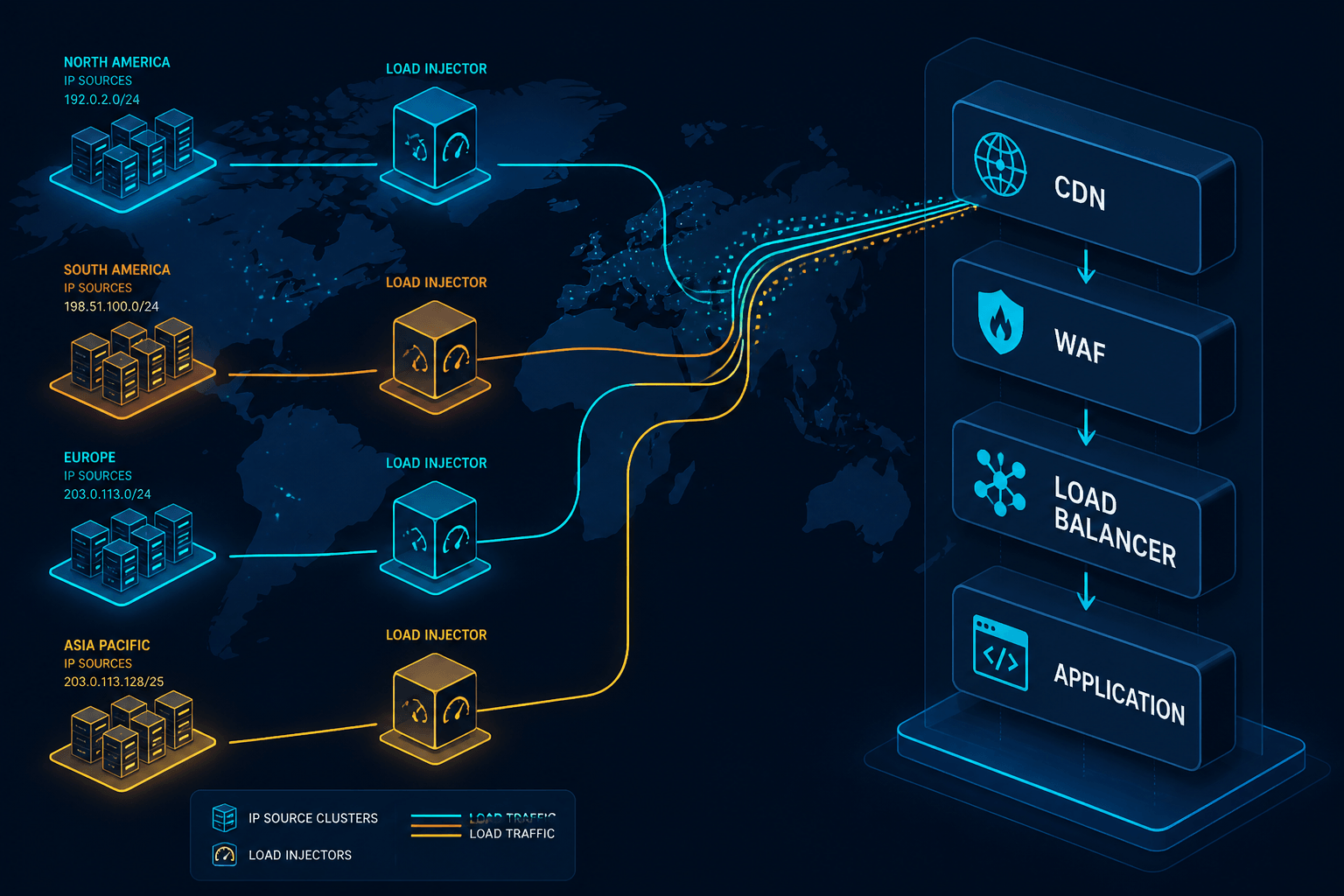
LoadView is built around this problem. The platform’s geo-distributed load injection network spans dozens of locations across North America, EMEA, APAC, and South America. Each location is a separate cloud region with its own egress IP space, so when a test runs across all of them, the source distribution at the target application reflects the geographic and network shape of real users rather than a cluster of cloud-egress addresses.
Two design choices matter for the failure modes above. First, LoadView runs web application load tests in real browsers, so connection counts, HTTP/2 coalescing behavior, and per-connection accounting on the server look like real users rather than a stripped-down protocol client. Second, the load injectors are managed cloud-side, which means there is no harness for the team to provision, no NAT-gateway port pool to babysit, and no temptation to run all generators in one region because that is what the budget allowed.
The combination matters more than either piece alone. Real browsers from one IP would still trigger the rate-limit and WAF distortions described above. Many IPs running protocol-only clients would still misrepresent connection-pool and HTTP/2 behavior. Real browsers driving load testing from multiple IP addresses across many regions reproduce both the network shape and the client shape that production sees.
One caveat to set expectations correctly: LoadView’s geo-distributed network is built on cloud regions, which gives you wide geographic and ASN spread but not residential or mobile-carrier egress out of the box. For workloads where a meaningful slice of production traffic comes from those networks (mobile-heavy consumer apps, for example), the right pattern is to combine LoadView’s regional cloud injectors with a residential or carrier-grade source you control separately. The earlier section on realistic IP distribution treats network diversity as a property of the test plan, not of any single tool.
Implementation Checklist
Before the next significant test, work through the following. The first step ties this checklist back to the source distribution discussion above—the production shape you map there is the target every later step is sized against.
Map the production source distribution. Pull a week of access logs and bucket requests by region, ASN, and IP-prefix density. A one-liner like awk '{print $1}' access.log | sort -u | wc -l gets you a unique-IP count from an NGINX or Apache combined log; pipe through a GeoIP/ASN lookup for the regional and ASN cuts. The shape of that distribution is the target your test should replicate. If you have concurrent user testing data already, use it as the baseline.
Identify the per-IP limits in your stack. Rate limiters at the edge, the API gateway, the application, and any third-party APIs. Note the budget on each. Any test that does not exceed the lowest budget on at least one IP is not validating that limit.
Pick injection regions to match production weight. If 60 percent of traffic comes from North America, 60 percent of generators belong there. Do not over-rotate to “test all regions equally” if production is unbalanced.
Confirm the egress ASN diversity. If every generator is in one cloud, the test still has the cloud-egress problem. At minimum, mix regions; better, mix providers (for example, combine two cloud providers with a residential or mobile-carrier exit network).
Slice the report by source. Latency, error rate, and throughput should each be broken out by region and ASN. If the slicing collapses to one bucket, the test was effectively single-source.
Reproduce a known WAF rule firing. Run a small test designed to trip a WAF rule you understand, and confirm it fires. If it does not, the test traffic does not look like production to your WAF, and the rest of the results are suspect.
FAQ
Why Do Load Tests From a Single IP Produce Wrong Numbers?
Production traffic arrives from many IPs across many networks. Rate limiters, WAFs, CDN edges, anycast routers, and connection pools all behave differently when traffic shares one source. A single-IP test stresses paths real users never touch and skips paths real users always touch, so the latency and throughput numbers reflect the test setup rather than the system.
Is IP Spoofing in JMeter the Same as Multi-IP Load Testing?
Not really. JMeter IP spoofing rotates the source IP at the OS level, but the packets still leave one machine with one default route, one ASN, and one geographic location. CDNs, anycast routers, and many WAFs key off the network path and ASN, not just the layer-3 source address. True multi-IP load testing distributes generators across separate networks and regions.
How Many IPs Do I Need for a Realistic Load Test?
There is no single number. The right target is enough IP and geographic diversity that no single source IP exceeds the per-IP rate limit you want to validate, and that the CDN edge and routing distribution roughly matches your production traffic mix. For most consumer-facing apps that means dozens to hundreds of distinct source IPs across multiple regions.
When Is Single-IP Load Testing Acceptable?
Single-IP testing is fine for component-level checks: a backend service behind an internal load balancer with no per-IP limits, a database driver benchmark, or a smoke test where you only care that the response is correct. In almost all cases, it is not enough for end-to-end performance validation of an internet-facing endpoint.
Does NAT mean a single IP can represent many users?
NAT and CGNAT do compress many real users behind one address, so per-IP rate limits in production already account for some clustering. The problem with single-IP tests is not that one IP cannot represent many users, but that one IP cannot represent the distribution of users you actually have. Real traffic spans thousands of NAT egresses, not one.
Plan a Load Test That Returns Numbers You Can Defend
If the test traffic does not match the source shape of production, the test results do not describe production. Distributed IP load testing across many regions is not a nice-to-have for capacity planning, security validation, or edge-routing correctness. Distributed load testing helps ensure your tests reflect how real users reach your application. Start with the checklist above, slice every report by source, and validate your assumptions about WAF and rate-limit behavior before the next launch rather than during it.