

The importance of website performance cannot be overstated for internal and government websites, especially when users rely on digital services to access important information, complete tasks, or receive public services. These platforms support communication, service delivery, and information sharing within organizations and with the public. Ensuring that these websites are reliable and capable of handling high traffic is crucial for maintaining public sector performance and building trust in digital services.
The Importance of Load Testing
Load testing is the process of simulating real-world usage of a website or application to determine how it behaves under different traffic conditions. For internal and government websites, this testing is especially important during high-traffic events such as policy announcements, emergency updates, tax deadlines, benefit enrollment periods, public service launches, or employee-wide system rollouts. Proper load testing helps identify potential bottlenecks so these critical platforms remain responsive and reliable.
Key Benefits of Load Testing for Internal and Government Websites:
- Enhances Website Reliability: Load testing helps identify and resolve performance issues before they affect end users. This is particularly important for government websites that must serve the public efficiently.
- Improves User Experience: By ensuring that internal applications and government websites can handle expected user traffic, organizations can provide a better experience for employees, citizens, and public users.
- Supports Compliance and Accessibility: Government websites often need to comply with specific requirements for data protection, accessibility, and service availability. Load testing helps confirm that these sites remain usable and responsive during periods of high demand.
The Challenges of Load Testing Internal or Government Websites
When it comes to load testing internal or government websites, organizations face unique challenges that can make the process more complex. These platforms often serve a diverse user base, from employees and contractors to citizens and external partners, each with different needs and usage patterns. Understanding these differences is key to effective load testing.
Many internal and government applications also integrate with legacy systems, authentication services, databases, APIs, and third-party platforms that may not be ready to handle heavy traffic. Resources can also be a challenge, as public sector organizations may work with limited budgets, smaller technical teams, or strict procurement processes. Finally, confidentiality and security are major concerns because internal applications often handle sensitive information. Load testing must be planned carefully so test activity does not expose private data or disrupt live services.
Load Testing Internal Applications Using LoadView
LoadView helps address the challenges of load testing internal applications and government websites by simulating real user interactions through real browser testing. This gives teams more accurate results that reflect how a website or application performs in the real world. LoadView is also scalable, allowing organizations to simulate thousands of virtual users to see how a site performs under both normal and peak traffic conditions.
The platform can also support regular testing as internal applications evolve, helping teams catch performance issues before they become larger problems. LoadView provides detailed reports and analytics that help identify bottlenecks, response time issues, and errors. With customizable testing scenarios, teams can tailor assessments to reflect their unique traffic patterns and ensure internal and government websites are prepared for high-demand periods.
Load Testing Internal Websites or Applications Using LoadView
We’ll walk you through a step-by-step guide on conducting a performance test for a website or application running behind a firewall using LoadView. LoadView offers the ability to run load injectors from specific IP addresses, which will need to be whitelisted for your internal websites or applications. Once those Load Injector IPs are whitelisted, you can run performance tests with your desired number of concurrent users.
- To get started, open the LoadView testing homepage. From there, select “Create New” to set up a new load test.

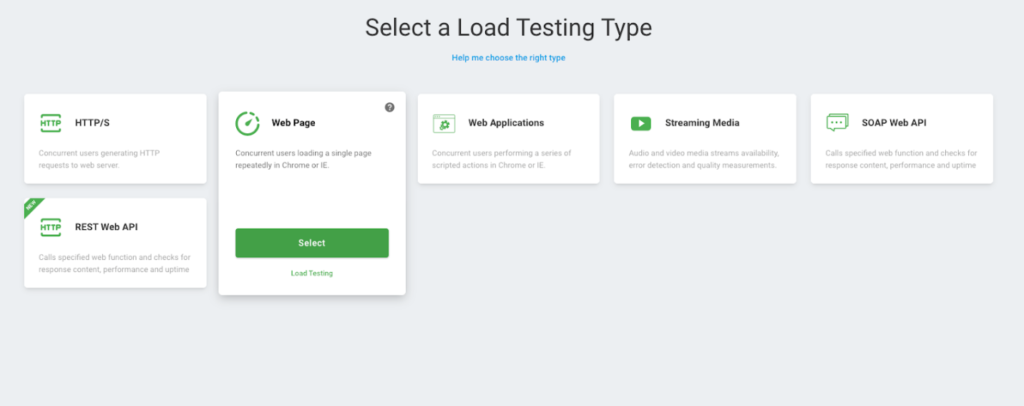
- Review the various types of tests available in LoadView, including web applications, web pages, streaming media, and APIs. For this example, select the “Web Page” option to start the setup process for the load test.
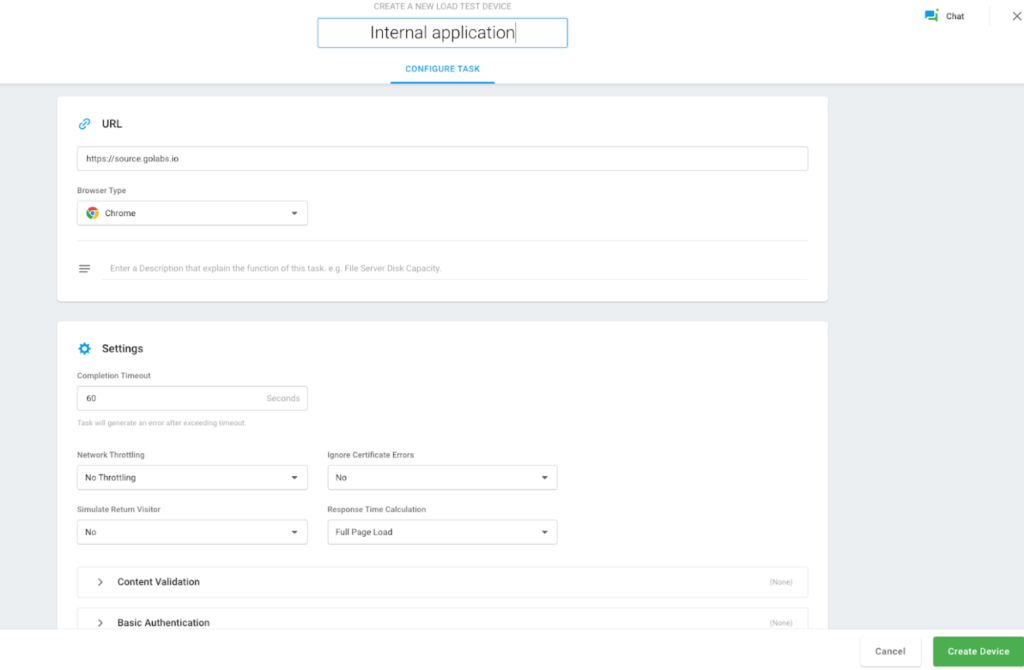
- A new window will appear where you’ll need to enter your internal website’s hostname, choose the browser, and specify the duration for the load test. After filling in these details, click the “Create Device” button to proceed.
- After successfully creating a device, you’ll be taken to the Test Scenario screen, where you can configure the load type based on the specific goals of your test.
- Load Based Curve: This option lets you run tests with a set number of users, gradually increasing traffic after a designated warm-up period.
- Goal Based Curve: Use this setup if you’re aiming for a specific number of transactions per second, scaling traffic gradually to meet your target.
- Dynamic Based Curve: This option allows you to adjust the user load in real time during the test. You can modify the number of users, set a maximum limit, and adjust the test duration dynamically.
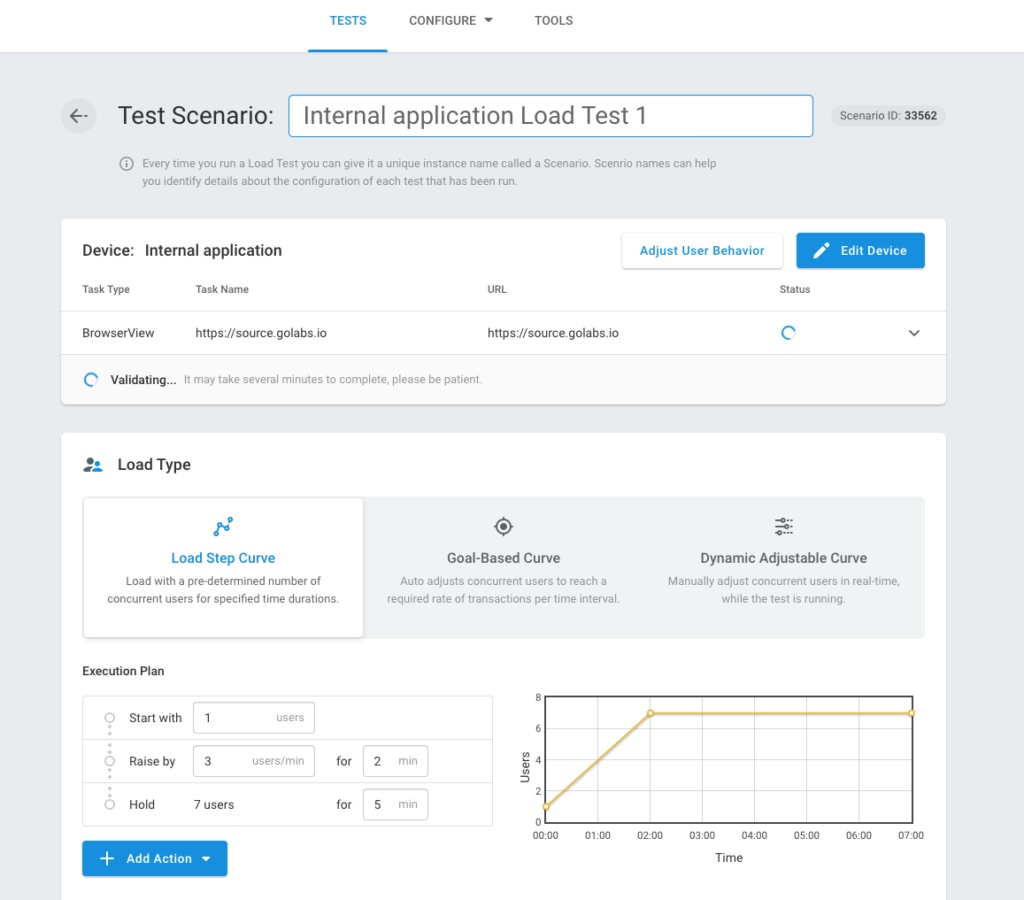
- On the Test Scenario screen, LoadView will attempt to validate access to the internal hostname. Since you’re testing an internal application, this validation will likely fail. To resolve this, you’ll need to whitelist LoadView’s load injector static IPs. Scroll down to the Load Injector Geo Distribution section and enable the “Use Static Proxy” option to proceed.
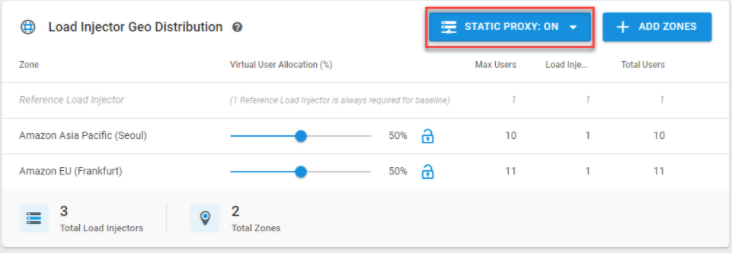
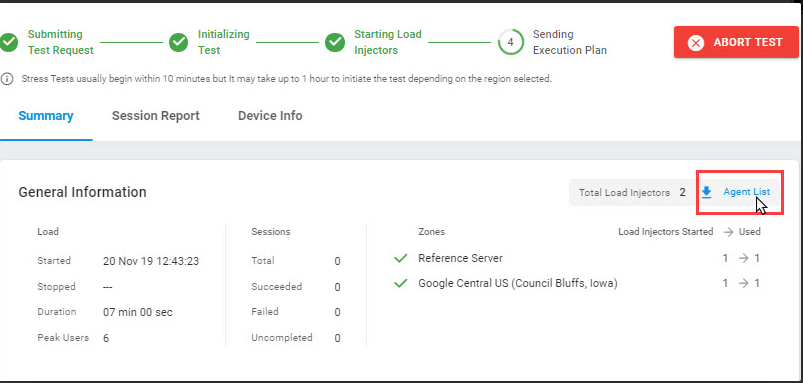
- After enabling the “Use Static Proxy” option, click “Add Zones” and choose the regions where you want the traffic to be generated from. Once selected, click the Start Test button. During the test run, navigate to the Agent List section to identify the static IPs. These IPs need to be whitelisted to allow the load generators to access your internal application.
- Be sure to whitelist all the IPs listed next to each zone name in the table. Keep in mind that the Load Injector IP addresses are unique for each test run, so you’ll need to update the whitelist with new IPs every time you run a new test.
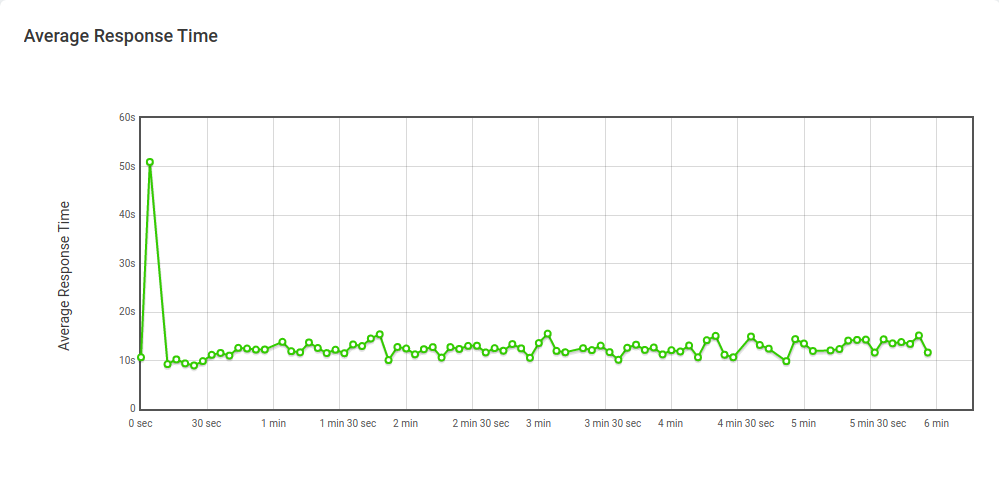
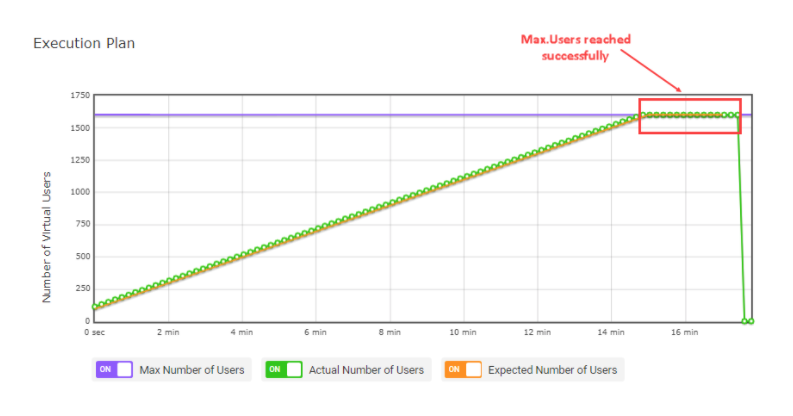
- Once the LoadView injectors’ static IPs have been whitelisted, you’ll be able to generate load and stress test your applications. After the load test completes successfully, you can review detailed insights such as response time graphs, concurrent user activity, error counts, and more. Here are a few examples of the insights you’ll see.
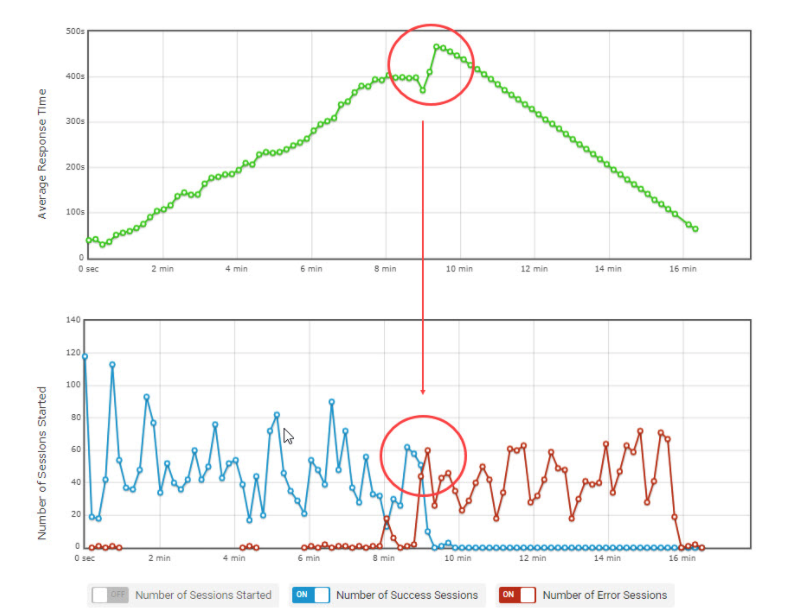
Parallel average number of users with average response time graph.
Conclusion
Ensuring the performance and reliability of internal and government websites is more important than ever when organizations serve important information, public services, or a diverse user base. Load testing is a critical process that enables organizations to prepare for varying user loads while improving public sector performance and user experience. By leveraging tools like LoadView, organizations can address the challenges associated with load testing and help ensure that their internal applications and government websites remain reliable and efficient.
Investing in load testing is not just a technical necessity. It is a commitment to delivering high-quality digital services to employees and citizens alike. By taking proactive steps to load test internal and government websites, organizations can build trust, improve accessibility, and enhance the overall user experience.