

What Is Performance Testing?
Performance testing evaluates how a website, application, API, database, network, or server behaves under different usage conditions. It helps teams measure speed, responsiveness, throughput, stability, scalability, and resource usage.
The goal is to identify performance problems before users are affected. A system may work correctly during functional testing, but still slow down, return errors, or become unavailable when traffic increases. Performance testing helps teams understand whether the application can support expected usage levels and where bottlenecks need to be fixed.
Common performance metrics include response time, throughput, error rate, concurrent users, requests per second, CPU usage, memory usage, network activity, and database performance.
Methods of Performance Testing
Performance testing is a broad category that includes several testing methods. Each method answers a different performance question.
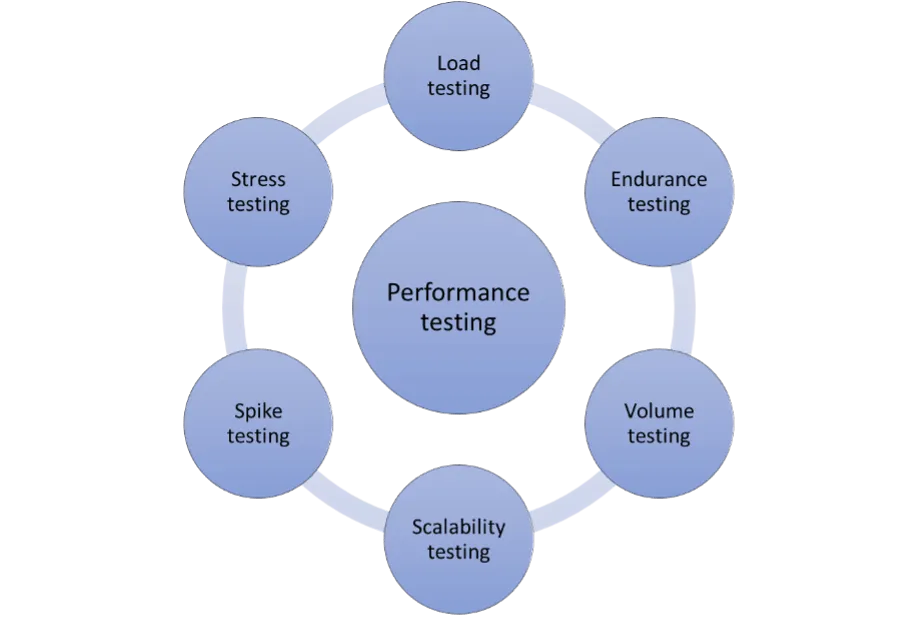
Figure 1: Methods of Performance Testing
- Load Testing: Load testing simulates expected user traffic on a website, application, or API. It measures how the system behaves under normal and peak usage levels.
- Endurance Testing: Endurance testing, also called soak testing, measures how a system performs under load for an extended period. It helps uncover memory leaks, resource exhaustion, queue buildup, and slow degradation.
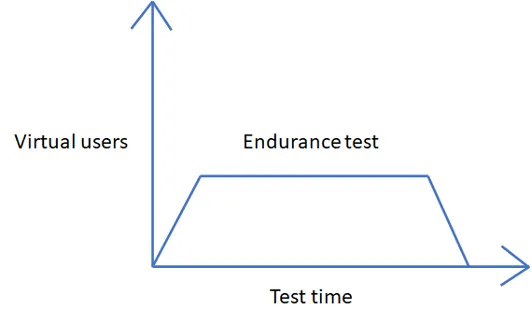
Figure 2: Endurance Testing
- Volume Testing: Volume testing evaluates how an application performs when it processes a large amount of data.
- Scalability Testing: Scalability testing measures how well a system performs as user load, request volume, data volume, or transaction volume increases or decreases.
- Spike Testing: Spike testing evaluates how a system responds to sudden increases or drops in traffic.
- Stress Testing: Stress testing pushes a system beyond expected load to identify its breaking point and observe how it fails and recovers.
Testing Methods Compared: A Real-World Example
Consider an ecommerce website preparing for heavy holiday traffic. The business wants to make sure the site can handle normal shopping activity, peak traffic, sudden surges, and long periods of demand without slowing down or failing.
Load testing can simulate expected customer traffic. Spike testing can model a sudden rush after an email campaign or flash sale. Stress testing can push the site past expected traffic to find the breaking point. Endurance testing can run traffic over a longer period to see whether performance degrades over time.
Performance testing results help the website owner identify bottlenecks, optimize the application, and prepare infrastructure before the holiday traffic arrives.
Performance testing is often tied to business requirements. For example, a customer may expect an event ticketing application to handle 50,000 requests per minute. Performance testing helps validate whether that requirement is realistic and whether the system can meet it.
What Is Load Testing?
Load testing measures how an application performs under realistic user load. The goal is to confirm that the website, application, or API can handle expected usage levels while maintaining acceptable response times, throughput, and error rates.
Load testing helps teams answer questions such as:
- How does the system perform under normal traffic?
- How does performance change during peak traffic?
- How many concurrent users or transactions can the system support?
- Where do response times begin to degrade?
- Which pages, APIs, or workflows create bottlenecks?
Methods of Load Testing
Volume Testing: Volume testing measures how a system behaves when it processes large amounts of data. This can include large files, database records, messages, transactions, or API payloads.
Scalability Testing: Scalability testing measures whether an application can maintain performance as load increases. It helps teams decide whether the system needs more capacity, better caching, database optimization, improved autoscaling, or architectural changes.
Load Testing: A Real-World Example
Consider an online store expecting a large number of sales during the holiday season. The business needs to know whether the application can handle expected traffic during browsing, product search, cart activity, checkout, payment, and order confirmation.
Load testing would simulate normal and peak traffic to measure response time, throughput, errors, and resource usage. The results would help the team optimize the site and reduce the risk of downtime or failed transactions during the holiday rush.
For example, if an application is expected to handle 5,000 requests per minute, load testing can validate whether the system performs acceptably near that level. This helps teams reduce the chance of failure before real users arrive.
What Is Stress Testing?
Stress testing evaluates how an application behaves under extreme conditions. Instead of testing only expected traffic, stress testing increases load until the system slows down, returns errors, becomes unstable, or fails.
The goal is to find the breaking point, understand how the system fails, and verify whether it can recover cleanly. Stress testing can also help teams decide where capacity, architecture, or infrastructure improvements are needed.
Methods of Stress Testing
Spike Testing: Spike testing measures how an application responds to sudden and significant increases in traffic. This is useful for flash sales, breaking news, product launches, registration windows, and major marketing campaigns.
Volume Testing: Volume testing can also be used in a stress testing context when teams need to understand how the application behaves under unusually large data loads.
Configuration Testing: Configuration testing evaluates how an application performs under different hardware, software, infrastructure, or environment configurations. This can help teams compare instance sizes, scaling rules, database settings, cache configurations, and deployment options.
Stress Testing: A Real-World Example
Consider a banking application that expects a large transaction volume at the end of the fiscal year. The business needs to know not only whether the application can handle expected traffic, but what happens if traffic exceeds the forecast.
Stress testing can push the application beyond expected demand to identify the point where response times degrade, errors increase, or services fail. Spike testing can simulate sudden bursts of activity, while volume testing can show how the system behaves when transaction data increases. The results help teams improve capacity, resilience, and recovery behavior.
If an API is designed to handle 5,000 simultaneous requests but the system receives more than that, it may slow down or fail. Knowing that limit allows teams to scale the application, tune bottlenecks, or set protective controls before production traffic reaches that point.
Key Differences Between Performance Testing, Load Testing, and Stress Testing
Performance testing, load testing, and stress testing are related, but they are not the same thing. Performance testing is the broad category. Load testing and stress testing are specific types of performance testing.
Performance testing measures overall speed, stability, responsiveness, scalability, and resource usage. Load testing focuses on expected and peak traffic. Stress testing pushes the system beyond normal limits to find breaking points and recovery behavior.
| Topic | Performance Testing | Load Testing | Stress Testing |
| Definition | The broad category of testing that evaluates speed, stability, scalability, responsiveness, and resource usage. | A type of performance testing that evaluates how a system behaves under expected and peak user load. | A type of performance testing that pushes a system beyond expected limits to find failure points. |
| Main Purpose | Understand overall system performance under different conditions. | Confirm whether the application can handle expected traffic and business demand. | Find the breaking point and understand how the system fails and recovers. |
| Typical Load Level | Varies by test type and objective. | Normal, expected, and peak traffic levels. | Extreme traffic or conditions beyond normal expectations. |
| Primary Metrics | Response time, throughput, error rate, resource usage, availability, and stability. | Response time, concurrent users, transactions per second, throughput, and error rate. | Error rate, breaking point, recovery time, saturation, and failure behavior. |
| Common Scenarios | Baseline testing, load testing, stress testing, spike testing, scalability testing, and endurance testing. | Expected traffic, peak traffic, campaign traffic, ecommerce checkout load, API request volume, and user journey testing. | Traffic beyond forecast, sudden overload, resource exhaustion, failover behavior, and system recovery testing. |
| Test Approach | Measure performance under defined conditions and compare results against goals or baselines. | Apply realistic traffic to verify whether the system meets performance targets. | Increase pressure until the system degrades, fails, or reaches a defined stop condition. |
| Common Tools | LoadView, JMeter, Gatling, LoadRunner, k6, BlazeMeter, and other performance testing platforms. | LoadView, JMeter, Gatling, LoadRunner, k6, BlazeMeter, and other load testing tools. | LoadView, JMeter, Gatling, LoadRunner, k6, BlazeMeter, and other stress testing tools. |
| Example | Measuring response time, throughput, errors, and resource usage across several test types. | Testing whether an ecommerce site can handle expected Black Friday traffic. | Pushing the ecommerce site beyond expected Black Friday traffic to find its failure point. |
Comparing Performance, Stress, and Load Testing: Wrapping It All Up
Performance testing is the broad practice of measuring how a system behaves under different conditions. Load testing is a specific type of performance testing that focuses on expected and peak usage. Stress testing is another type of performance testing that pushes the system beyond expected limits to identify breaking points and recovery behavior.
All three are useful, but they answer different questions. Performance testing asks, “How does the system perform?” Load testing asks, “Can the system handle expected demand?” Stress testing asks, “What happens when the system is pushed too far?”
Using these methods together gives teams a clearer understanding of speed, stability, capacity, scalability, and risk before users are affected.
To put these methods into practice, LoadView’s performance testing services can help your team plan and run load and stress tests, analyze results, and prioritize improvements.